
Your Password Wasn't Stolen. Your MFA Wasn't Broken. So How Did the Attacker Get In?

Authentication is only the beginning
When we design authentication, we tend to spend most of our time thinking about the login.
Username and password. MFA. OTP. Authenticator applications. Passkeys. Biometrics. Conditional access.
All of these controls are important. But authentication is only one stage in a much longer security lifecycle.
Consider a normal web login. A user enters a username and password. The identity provider validates them and asks for a second factor. The user approves the request.
Authentication succeeds.
What happens next?
The application cannot realistically ask the user to enter their password and complete MFA every time they click a button or call an API. Instead, the system establishes a session.
User
  |
  | Username + Password
  v
Identity Provider
  |
  | MFA Challenge
  v
User
  |
  | MFA Approved
  v
Identity Provider
  |
  | Authentication Successful
  v
Session / Tokens Issued
  |
  v
Browser
From this point onwards, the browser carries some form of authentication state. Depending on the application architecture, that could involve:
- a session cookie
- an access token
- a refresh token
- or a combination of these
That authentication state is what allows the application to recognize subsequent requests as belonging to an authenticated user.
Before authentication, the attacker needs to prove who they are. After authentication, possession of the right session material may be enough.
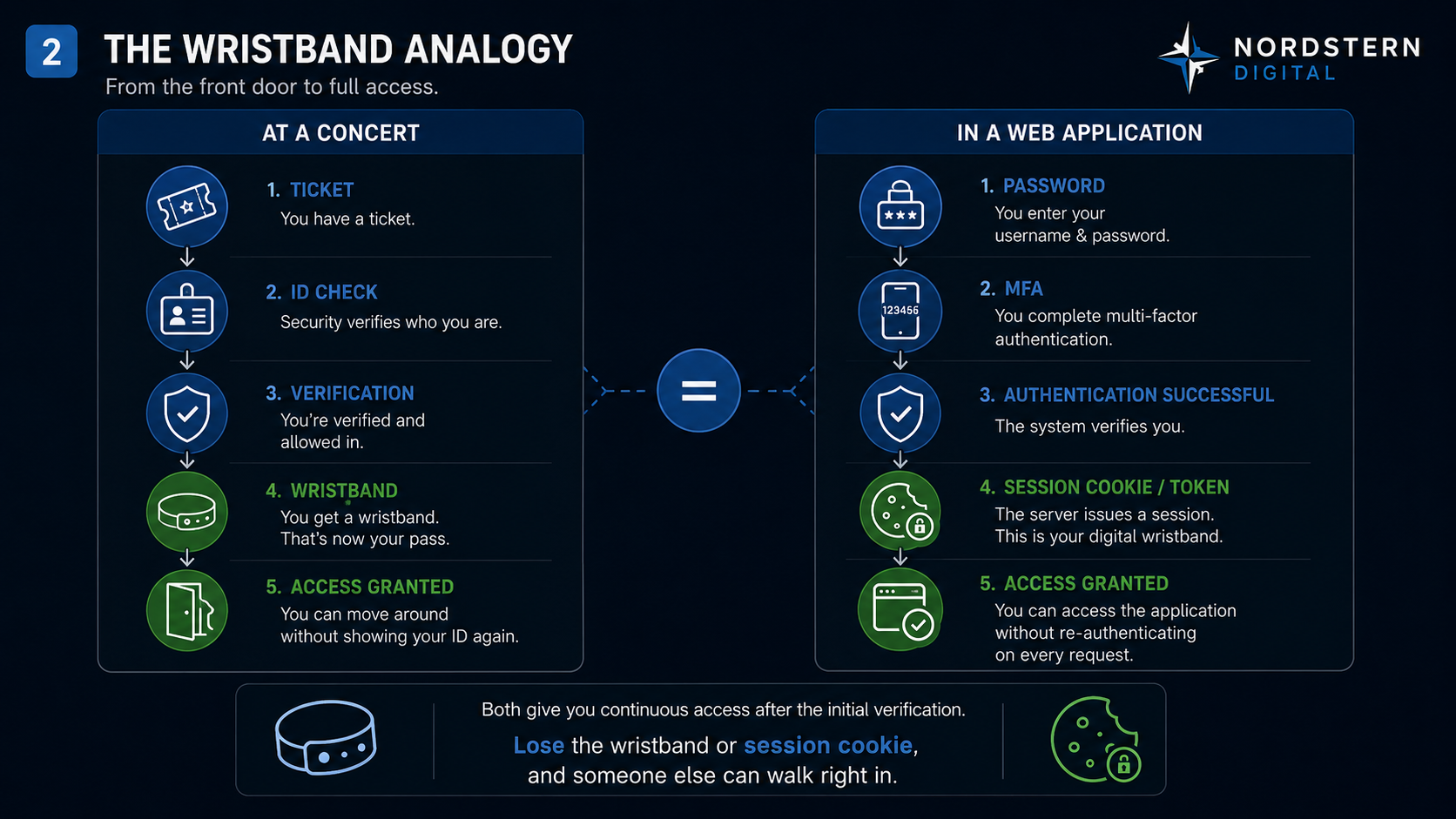
Think of it as a wristband
Imagine attending a concert.
At the entrance, security checks your ticket and your identity. Once everything is verified, they put a wristband around your wrist.
For the rest of the evening, nobody asks you to show your ticket every time you move between areas. They look at the wristband.
The web works in a somewhat similar way.
Your password and MFA are the entrance checks. Your authenticated session is the wristband.
Now imagine that someone could make a perfect copy of that wristband.
They wouldn't need your ticket. They wouldn't need your ID. They wouldn't need to convince the person at the entrance.
They would simply walk around carrying something the system already trusts.
That is the basic problem behind session hijacking.
What does this look like technically?
In a traditional server-side session architecture, the application might issue the browser a cookie such as:
Set-Cookie: session_id=A8F73C9E...; Secure; HttpOnly; SameSite=Lax
The browser then sends that cookie with subsequent requests:
GET /account
Cookie: session_id=A8F73C9E...
The application receives the request and checks its session store.
A8F73C9E
    |
    +--> User: Arun
    +--> Authenticated: Yes
    +--> MFA Completed: Yes
    +--> Role: Administrator
    +--> Session Expiry: 14:30
Notice what is not happening.
The application isn't asking for Arun's password again. Nor is it necessarily asking Arun to complete MFA again.
It is asking:
Is this session valid?
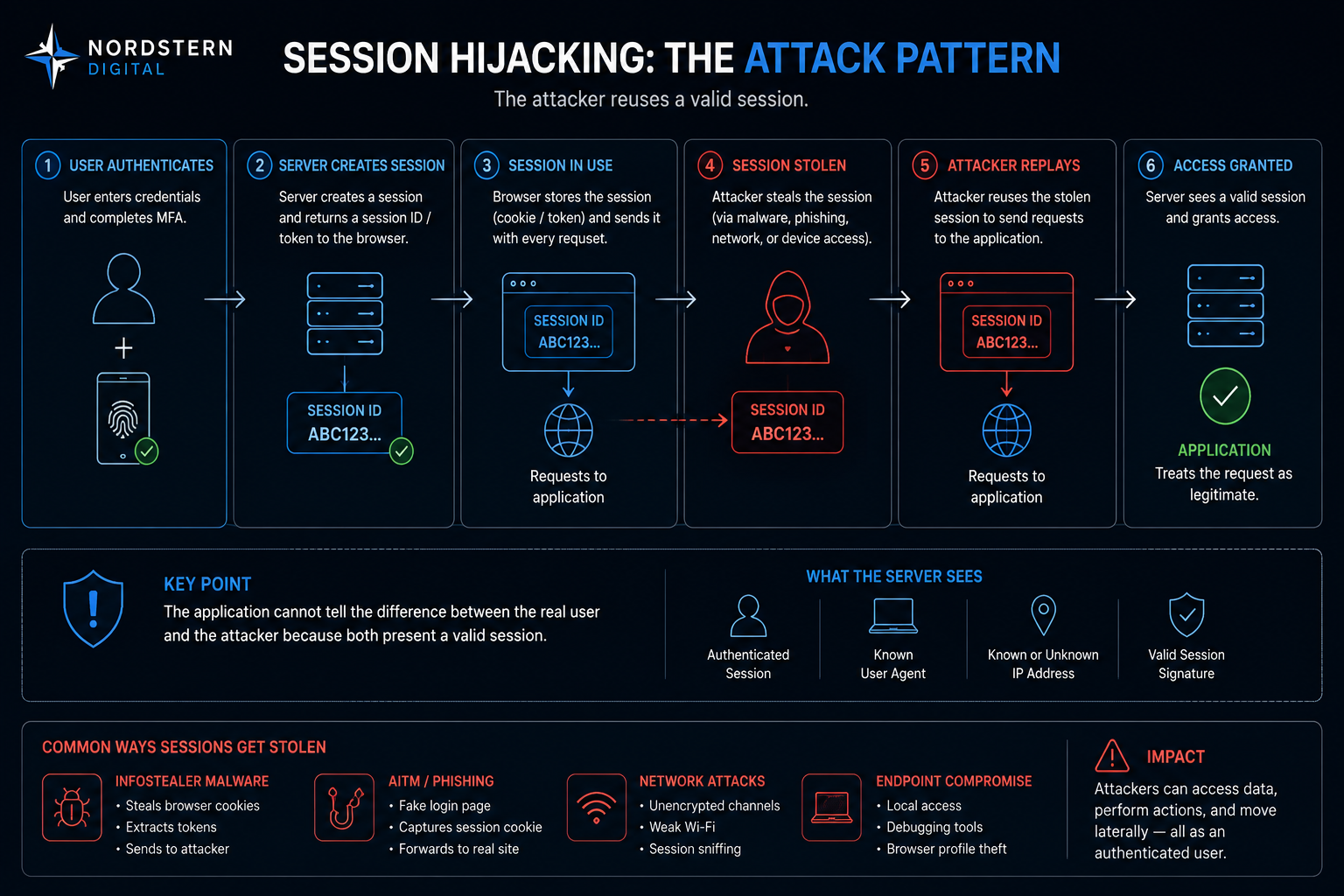
If an attacker obtains usable session material and successfully replays it, the request may arrive carrying the same proof of authentication as the legitimate browser.
This is why session identifiers and many access tokens are treated as bearer credentials. Possession matters.
MFA wasn't necessarily bypassed
We often hear: "The attacker bypassed MFA."
Sometimes that is accurate.
But in a session-theft scenario, a more precise description may be:
MFA was successfully completed, and the attacker subsequently obtained the authenticated session.
MFA protects the authentication ceremony. Session security protects what happens after that ceremony succeeds.
Those are related problems, but they are not the same problem.
How does an attacker obtain a session?
There are several possibilities. Three are particularly worth understanding.
1. Infostealer malware
Consider a laptop on which the user has already authenticated to Microsoft 365, Google Workspace, GitHub, AWS, Slack or internal applications.
The browser has to maintain enough state to keep those sessions working.
Malware running on the endpoint with sufficient access may attempt to extract browser information, including cookies, tokens, stored credentials and other authentication material.
Traditional credential theft looks roughly like:
Steal Password
      |
      v
Attempt Login
      |
      v
Encounter MFA
Session theft is different:
User Logs In Normally
      |
      v
MFA Successfully Completed
      |
      v
Authenticated Session Created
      |
      v
Session Material Stolen
      |
      v
Attacker Attempts Replay
The attacker is attacking the result of authentication, not necessarily authentication itself.
2. Adversary-in-the-Middle phishing
Instead of presenting a simple fake login form, an attacker can operate a reverse proxy between the victim and the real service.
Victim
   |
   v
Attacker-controlled proxy
   |
   v
Real Identity Provider
The victim enters the username and password. The proxy relays them to the legitimate identity provider.
The identity provider asks for MFA. The challenge is relayed back. The victim completes MFA.
The identity provider correctly concludes that authentication succeeded and issues authenticated session material.
But the attacker is sitting in the middle of that exchange.
The attacker hasn't cracked the MFA algorithm. The victim actually completed MFA. The attack targets the session established after successful authentication.
This is one reason phishing-resistant authentication mechanisms such as FIDO2/WebAuthn and passkeys are important. Their origin-binding properties make this class of credential-relay phishing substantially more difficult.
3. Browser and endpoint compromise
The browser has become an important security boundary.
We install extensions for productivity, screenshots, note-taking, password management, development, AI assistants and many other purposes. Some request broad permissions.
That doesn't mean browser extensions are inherently unsafe. But their permissions deserve the same scrutiny we apply to other software.
If something executing within the browser or endpoint obtains sufficient access to sensitive authentication material, the attacker may no longer need to attack the login page.
The browser is sitting after authentication. That makes it an attractive target.
"But shouldn't the server notice?"
Sometimes it can.
Saying that a server can never distinguish a stolen session from the legitimate user would be an oversimplification.
Modern identity platforms and security systems can evaluate additional context such as:
- source IP address
- ASN and network reputation
- geographic location
- device characteristics
- browser characteristics
- session age
- impossible-travel scenarios
- previous login behaviour
- risk signals
- token replay indicators
- device compliance
- continuous access evaluation
A mature identity architecture therefore doesn't simply ask:
Is the token valid?
It increasingly asks:
Does the context in which this valid token is being used still make sense?
Why changing the password may not be enough
When an account compromise is suspected, the instinctive response is: change the password.
Absolutely do that. But don't stop there.
Depending on how the application and identity provider manage sessions, changing a password may not automatically invalidate every session that has already been issued.
An existing session could potentially remain valid until it expires, the user explicitly signs out, an administrator revokes it, the identity provider invalidates it, its refresh capability is revoked, or a risk policy terminates it.
A more complete response is:
Suspected Account Compromise
            |
            v
Isolate / inspect compromised endpoint
            |
            v
Use a trusted device
            |
            v
Change credentials
            |
            v
Revoke active sessions
            |
            v
Revoke relevant refresh tokens
            |
            v
Review registered devices
            |
            v
Review MFA methods / passkeys
            |
            v
Review recovery mechanisms
            |
            v
Review authentication history
The sequence matters too. If the endpoint is infected and the user changes the password from the same compromised machine, the new credentials may also be exposed.
Session cookie, access token and refresh token are not the same thing
These terms are often used interchangeably in casual discussions, but architects should distinguish them.
Session cookie
In a traditional application, the browser might receive an opaque identifier:
SID=ABC123
The actual session exists on the server:
ABC123
  |
  +--> userId
  +--> roles
  +--> loginTime
  +--> expiry
Revocation can be relatively straightforward because the server controls the session record.
Access token
Modern APIs frequently use access tokens:
Authorization: Bearer eyJhbGciOi...
The API validates the token and authorizes the request. Access tokens should normally have limited lifetimes.
Refresh token
A refresh token allows the client to obtain new access tokens without forcing the user through the complete authentication process again.
That makes refresh tokens particularly sensitive.
Stealing an access token may give an attacker a relatively short window. Stealing a usable refresh token can potentially extend access considerably, depending on token rotation, revocation and identity-provider policies.
This is why token lifecycle design deserves as much attention as token generation.
What should architects and engineering teams do?
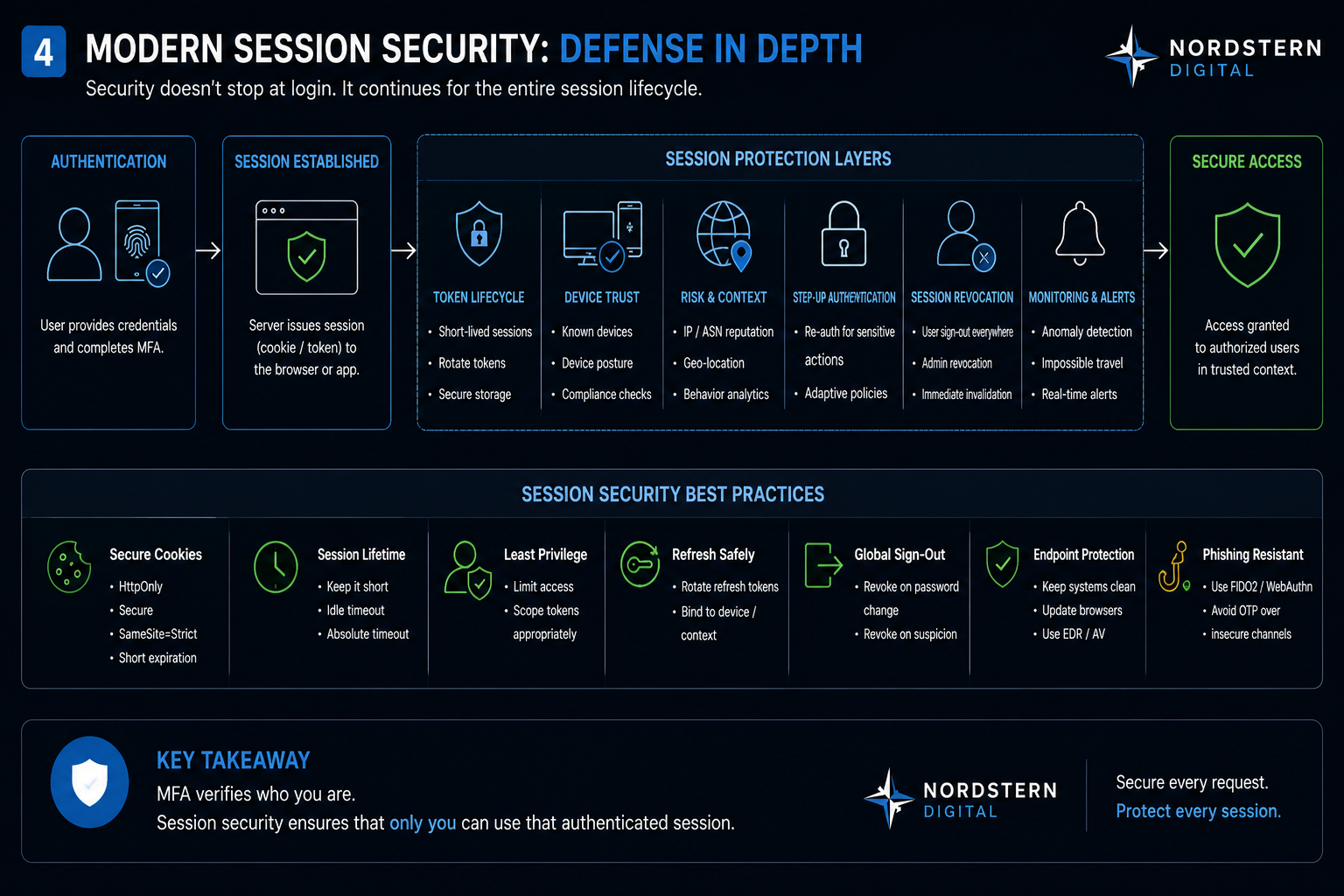
There isn't one control that solves session theft. This is a defence-in-depth problem.
Protect cookies properly
Web applications should make appropriate use of cookie controls such as Secure, HttpOnly and SameSite.
Secure prevents the cookie from being transmitted over ordinary HTTP.
HttpOnly prevents normal client-side JavaScript from directly accessing the cookie, reducing exposure to some classes of attacks.
SameSite can help restrict when cookies are sent in cross-site contexts.
These are important controls. They are not magic shields against a fully compromised endpoint.
Keep sessions appropriately short
There is always a trade-off between security and usability.
A session that lasts indefinitely provides convenience. It also provides a much larger window in which stolen authentication material may remain useful.
High-risk applications should think carefully about idle timeout, absolute session lifetime, access-token lifetime, refresh-token lifetime, refresh-token rotation and re-authentication requirements.
The right values depend on the application's risk profile. A banking application and a news website should not necessarily have identical session policies.
Re-authenticate sensitive operations
Being logged in shouldn't necessarily authorize every operation forever.
Actions such as changing a password, modifying MFA, adding recovery mechanisms, creating API keys, changing payment details, adding privileged users, changing security policies or performing high-value transactions may deserve step-up authentication.
Even if an attacker obtains an existing session, requiring stronger verification for sensitive operations can limit the damage.
Make session revocation easy
Users should have an obvious way to see where they are logged in and to sign out everywhere.
Administrators should also be able to revoke sessions centrally when compromise is suspected.
During an incident, this becomes extremely important.
Protect the endpoint
If the endpoint itself is fully compromised, many application-layer protections become substantially less effective.
Endpoint detection and response, browser hardening, patching, extension governance, malware protection and device compliance therefore belong in the identity-security conversation.
Identity and endpoint security can no longer be treated as completely separate disciplines.
Prefer phishing-resistant authentication
Traditional MFA is still substantially better than passwords alone.
But SMS OTP, TOTP, push approval and phishing-resistant cryptographic authentication should not all be treated as equivalent.
FIDO2/WebAuthn-based authentication and passkeys can provide stronger resistance to phishing because authentication is bound to the legitimate origin.
The bigger architectural lesson
For years, security architecture concentrated heavily on the moment of login.
That made sense. Passwords were weak, reused and frequently stolen. MFA addressed an enormous part of that problem.
Attackers adapted.
If getting through authentication becomes difficult, attacking what happens after authentication becomes increasingly attractive.
So when reviewing an application's identity architecture, I wouldn't stop with:
Do we support MFA?
I would continue asking:
How are sessions created?
Where are tokens stored?
How long are they valid?
How are refresh tokens protected?
Can sessions be revoked immediately?
What happens after a password reset?
Which operations require re-authentication?
Can we detect abnormal use of an otherwise valid session?
What happens when the endpoint itself is compromised?
Those questions tell us considerably more about the security of an application than the presence of an MFA checkbox.
Authentication is an ongoing state
The most important takeaway is simple.
A successful login should not be treated as the end of authentication security.
It is the beginning of an authenticated session that now has to be protected.
Identity
   |
   v
Authentication
   |
   v
MFA / Passkey
   |
   v
Session Established
   |
   v
Session Protection
   |
   +--> Token lifecycle
   +--> Device trust
   +--> Risk evaluation
   +--> Step-up authentication
   +--> Revocation
   +--> Monitoring
Security has to exist throughout that chain.
Because sometimes an attacker doesn't need to break through the front door.
They only need to steal the wristband from someone who already got in.
About the author
Mahesh Maney writes about cybersecurity, software architecture, cloud, IoT and the engineering decisions behind secure digital platforms at Nordstern Digital.
Nordstern Engineering Notes
We write about the engineering decisions behind secure software, cloud, IoT and modern digital platforms — not just the technologies used to build them.
Need help designing secure digital systems?
Talk to Nordstern Digital about your architecture, engineering or cybersecurity requirements.
Back to all insights